Identifying Fake Emails and Phishing: A Cybersecurity Handbook
One in three security breaches starts with a phishing email, making this one of the most common and dangerous threats in cyberspace. Email is more than just a communication tool; it is the primary gateway for scams and hacking attacks. No matter how advanced spam filters get, phishing messages are growing more sophisticated and increasingly landing in our inboxes.
Imagine saving hours and avoiding the headache of restoring compromised accounts, financial losses, or identity theft—all by recognizing red flags early. This cybersecurity guide for beginners provides practical skills for fraud protection and helps you stay ahead of scams. You will learn how to identify threats before you even think about clicking. But if you want a complete “set and forget” safety net for your business, check out our Cybersecurity Services & Proactive Website Protection.
Think you’re immune to deception? Pause and put your instincts to the test—take this brief phishing quiz by Google before you read on. Challenge yourself: can you spot the scams before they fool you?
The First Glance: Unmasking the Fake Sender
Before reading the content, examine the “metadata” of the message. Often, an email scam is hidden exactly where we least expect to look.
1. The “Sender Name” – The Biggest Lie
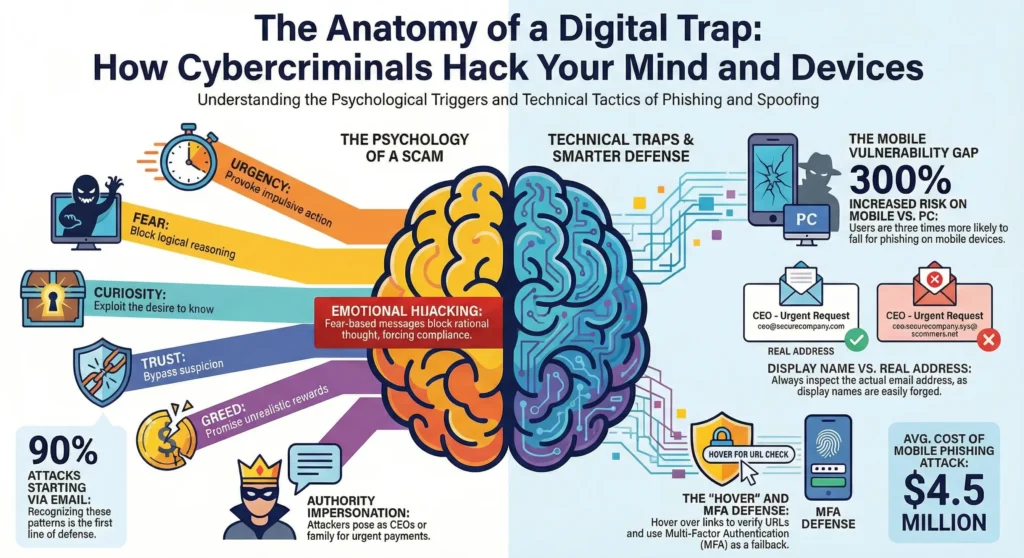
Do you trust the name you see in the “From” field? You shouldn’t. Just last month, a busy office worker clicked an urgent email that seemed to come from her company’s CEO and unknowingly sent out sensitive files—only to find later that the real sender was a scammer with a faked display name. This technique, called Display Name Spoofing, is one of the oldest yet most effective tricks used in phishing attacks.
- How it works: Technical protocols allow anyone to enter whatever they choose in the name field. A scammer can label themselves “Microsoft Outlook,” “Apple Support,” or even your company’s CEO.
- The Trap: Mobile phones often display only this name, hiding the actual email address to save screen space.
- The Solution: Always expand the message header by clicking on the name to reveal the real address behind it. If the name is “Bank Support” but the address is ivan@abv.bg or support@random-site.com, it is a definitive sign of fraud. If you are a business owner, ensuring your own outgoing mail is authenticated is a key part of our Professional Website Maintenance & Support, which prevents your domain from being spoofed.
2. Typosquatting: The “Letter Game.”
Attackers register domains that are visually nearly identical to legitimate ones. This technique, called Typosquatting, relies on users reading too quickly. It is like a fake storefront with a sign that swaps a single letter or number. The front looks almost the same as the real deal, but behind the door, it is a scam.
- Numbers instead of letters: paypa1.com (using the number “1” instead of the letter “l”) or faceb00k.com.
- Swapped letters: gogle.com or microsfot.com.
- Added words: amazon-support.net or paypal-security.com.
- Cyrillic vs. Latin: Using a Cyrillic “а” in a Latin domain. To the naked eye, they look identical, but to a computer, they are completely different websites.
3. Generic Greetings
If your bank writes to you, they know your name. Spam messages are sent in bulk. Salutations such as “Dear Customer,” “Dear User,” or a simple “Hello” are red flags that the letter is not personalized.
Social Engineering: The Psychology of the Attack
Mind Hack #1: Urgency
Attackers don’t just target your computer: they target your psyche through social engineering.
Urgency and Fear
The goal is to trigger panic, which bypasses logical thinking. This is a core element of every successful phishing attempt:
- “Your account will be deleted within 24 hours!”
- “You have an unpaid invoice!”
- “Your shipment has been detained!”
Remember: Any message pressuring you to act IMMEDIATELY is suspicious. Legitimate institutions do not issue ultimatums by email. Think back: has an email ever made you feel anxious and rushed to act? Reflecting on your experience can help you spot these emotional triggers in the future and remind you to pause and verify before responding.
Curiosity and Greed
If fear fails, temptation follows:
- Greed: “You won an iPhone,” “Inheritance,” “Unexpected Investment.” The golden rule of cybersecurity applies here: if it sounds too good to be true, it’s a lie.
- Curiosity: “See who viewed your profile” or “I’m attaching the photos from last night.” This is a subtle trap designed to make you download an infected file. While you’re staying vigilant against scams, you can use AI to safely analyze your own site traffic. Learn more about how we implement these tools in our AI Solutions & Analytics.
Technical Inspection: Suspicious Links and Files
You do not need to be a programmer to perform a quick security check. The next time you see a suspicious link, use the HOVER system to keep yourself safe. This acronym turns five protective steps into an easy-to-remember checklist:
- H – Hover your mouse over the link (on computers) or press and hold (on phones) to reveal the actual destination.
- O – Observe the full address. Does it match what you expect? Look for odd spellings, subtle changes, or extra words.
- V – Verify the sender. Is this someone you know or trust? Double-check their email address for typosquatting tricks.
- E – Examine anchor text. The displayed text may say “Local Bank” or “Support Team,” but the real link could lead elsewhere. Always check that the visible text and the actual URL match.
- R – Refer to security tools. If you still feel unsure, copy the suspicious link and paste it into VirusTotal.com. This free Google-owned platform scans links against dozens of global antivirus databases. If even one result turns up red, delete the email right away. For website owners, we’ve developed a specialized AI Cyber Checker for passive analysis and proactive security.
Use the HOVER checklist to outsmart scammers and build safer habits online.
How to check a link WITHOUT clicking
Links often have “anchor text” (e.g., “Login here”) that masks the true destination.
- On a PC (Hover): Hover your mouse cursor over the link without clicking. The actual address will appear in the bottom corner of your browser. If the text says “Local Bank” but the address is
bit.ly/234orbank-verify-now.com, do not open it. - On a Phone (Long Press): Press and hold your finger on the link until a menu appears showing the full URL. Inspect it carefully.
Expert Tip: Use VirusTotal If you are still unsure if a link or attachment is safe, don’t guess. This free platform, owned by Google, acts as an aggregator that scans files or links against dozens of global antivirus databases simultaneously. If even one result turns up red, delete the email.
Be Wary of Attachments
This is the classic method for delivering viruses or ransomware.
- Never open .zip, .exe, or .scr files unless you’re expecting them.
- Avoid files with unfamiliar extensions: .ecc, .ezz, .exx, .zzz, .xyz, .aaa, .abc, or extensions consisting of random characters.
- Even .pdf, Word, and Excel files can contain harmful macros.
- Be skeptical of files from “colleagues”: their email accounts may have been compromised.
How to See “Hidden” Data (Header Analysis)
Want to know if a letter really came from your bank or an impostor? Look at the headers. This is the email’s “digital passport” and is very difficult to fake successfully. Headers provide the context needed to verify senders, track the delivery path, and spot manipulation.
- In Gmail: Open the email ➔ Click the three dots (top right) ➔ Select “Show original.” Look for lines that start with Received: or Return-Path. If your bank is writing to you from a server in a country you have no connection to, it is a scam.
- In Outlook: File ➔ Properties ➔ Internet headers.
- In Apple Mail: View ➔ Message ➔ All Headers.
What to Do If You Suspect Fraud
How should you react when your online security is in question?
While it seems logical to opt out, this button is a trap in spam attacks:
- It confirms you are active: Clicking tells the hacker, “This email is live, and there is a real person behind it who clicks.” This makes you a priority target.
- Risk of infection: These links often lead directly to malicious sites.
- The solution: Use the built-in “Mark as Spam” or “Block Sender” buttons provided by your email provider.
The Golden Rule of Verification
If you receive an email from a bank, courier, or service that appears important, do not click any links until you verify the sender is legitimate. A single careless click can have real consequences. One user, Jane, thought she was updating her details for her bank and ended up paying $300 in unauthorized fees after entering her information on a fake site. Taking a minute to verify could save you hours of trouble and a lot of money. Open your browser and manually enter the official website’s address.
- Check your status (shipment or account) through your official profile.
- If the message demands urgent action, call the official phone number found on their website, not the one provided in the email.
Bonus: Why Phones Are the “Weak Link”
Picture this: On the train, Lisa opened her email, quickly scanned a message, and missed the hidden “.ru” in the sender’s address. It is easy to let down your guard when you are multitasking or distracted. Just one small detail can make all the difference.
Statistics show that people are four times more likely to fall for phishing on their phones. Why?
- Hidden information: Smaller screens often hide the sender’s full email address.
- Difficult verification: Checking links without a mouse is harder and less intuitive.
- Distractions: We often use phones on the go, which lowers our vigilance.
Pro Tip: If you receive an email involving money or passwords, leave it “unread” and check it later on a computer. You can inspect the details more carefully on a larger screen.
Stay vigilant! Security is not just software: it is a mindset.
Frequently Asked Questions
What if I already clicked the link but didn’t enter any data?
Take a deep breath. Panicking only helps attackers, so pause before reacting. Don’t worry—you can still take steps to protect yourself. The click itself might have confirmed your email is active or triggered a malicious script.
Close the browser window immediately.
Run a full scan with your antivirus software.
Monitor your device for strange behavior, such as slow performance or pop-up windows.
I entered my password on a fake site. Is my account lost?
Time is critical! Act immediately:
Go to the real website (type the address manually) and change your password.
If you use that same password elsewhere (Facebook, Instagram, etc.), change it there too.
Enable Two-Factor Authentication (2FA) everywhere possible. This stops hackers even if they have your new password..
Is it dangerous to just open the email without clicking anything?
The risk of simply opening an email to read the text is minimal. Modern services like Gmail and Outlook block automatic image loading to protect you.
Important: Do not click “Load Images” if the sender is suspicious. Images can contain “trackers” that tell scammers exactly when and where you opened the message.
The site had a “padlock” icon and started with HTTPS. Doesn’t that mean it’s safe?
This is a major myth. The “padlock” only means the connection between you and the site is encrypted. It does NOT guarantee the site is legitimate. Hackers frequently use HTTPS certificates for fake sites to create a false sense of security. Think of it this way: HTTPS is just a secure tunnel. It keeps your information safe from eavesdroppers as you travel online—but if the tunnel leads straight to a robber’s house, your data arrives safely in the wrong hands. You can have a secure, encrypted connection directly to a thief.
Why didn’t my spam filter catch this?
Hackers constantly evolve their tactics: using new domains not yet blacklisted, compromising legitimate servers, or phrasing text to bypass AI filters. Your own attention remains the best defense.
Did you find this information useful? Cybersecurity is a team effort. Share this article with friends, colleagues, or older relatives who may be more vulnerable. A single share could prevent a loved one from facing a major security breach.